Updates

What's new in ibana

Stay up to date with the latest features, improvements, and fixes to ibana.

Invoice approval and routing, handled by agents

  • Feature
  • Automation

Most incoming invoices are not decisions. They are the same subscription, the same rent, the same supplier as last month — and someone still has to open each one, pick the right approval workflow, and click approve.

The ibana invoice agent can now do that part. It is now in public beta and rolling out to all organizations.

Describe the rule, review the policy

You start with one sentence:

Auto-approve recurring SaaS invoices below EUR 1,000 if the amount is unchanged from last month.

ibana drafts a structured automation policy from it — the invoices it applies to, the safety checks that must hold, what the agent should evaluate, and what happens if the check passes or fails. You review and edit that policy before it ever runs.

Policies can:

  • approve an invoice
  • route it to a specific approval workflow
  • suggest a workflow and leave the decision to a person
  • add an explanation and do nothing else

Predictable where it has to be

An invoice releases money, so the agent is deliberately not left to improvise:

  • Which invoices a policy applies to, and the safety checks it must clear, are evaluated as hard rules in code — not by a model.
  • The agent judges only the part that needs judgement, such as whether this invoice is materially unchanged from the last approved one.
  • The action is always the one you configured. The agent never invents it.
  • When several policies match, the more cautious one wins: routing to a human beats auto-approval.

Every decision is recorded on the invoice as a first-class approval event with the policy, its version, and the evidence behind it — so a decision made months ago can still be audited against the policy that existed at the time.

Custom agents for everything else

Alongside the invoice agent, you can now build your own custom agents for the smaller, repetitive work: reading a campaign code printed on an invoice and mapping it to a cost center, filling a custom field, leaving a comment, or notifying the right colleague.

Custom agents work in plain language too, run whenever an invoice arrives, and keep a full log of what they did and why. They can comment, set accounting and custom fields, and notify people you have explicitly mentioned in their instructions.

They cannot approve invoices or route them to a workflow — not as a setting you could switch on, but because those tools do not exist for them. Releasing money stays with the invoice agent and its policies.

The invoice agent and custom agents are free during the public beta.
Read the documentation →

Bookkeeping export for outgoing invoices

  • Feature
  • Accounts Receivable

Incoming invoices have had a full path to bookkeeping for a long time. Outgoing invoices did not — they were tracked, reminded and reconciled in ibana, and then re-entered somewhere else for accounting.

Outgoing invoices now go through the same export as incoming ones.

Accounting on the revenue side

The invoice detail has an accounting section for outgoing invoices: revenue accounts, tax codes, cost centers, and splits when a single invoice belongs to more than one account or tax rate. Splits behave exactly as they do on the accounts payable side, in the same editor, and per-split tax rates are supported. Sales tax codes can be set up alongside the input tax codes you already maintain.

Custom fields can be edited directly on the invoice, and both accounting and custom field changes appear in the activity feed.

Export

A dedicated tab on the export page covers outgoing invoices, ships the invoice documents alongside the data, and records the export as a download so you can see what was already handed over and re-download it if your tax consultant needs it again.

Payments from outside the bank

Outgoing invoices can also be settled by means other than a bank transfer — cash, card, offsetting — and marked as paid in bulk, so an invoice that was settled outside your connected accounts no longer sits open forever.

Read more in the documentation: Export und Auswertungen.

Email inbox for incoming documents

  • Feature
  • User Interface

Sending invoices to ibana by email is the easiest way to get them in — and the hardest to check. Once a mail was sent, whether it arrived, what was in it, and what happened to each attachment was largely invisible.

There is now an email inbox that shows every message that reached your ibana address, broken down per attachment rather than per email.

For each attachment you can see:

  • what ibana recognised it as — an invoice, a card statement, or something that is neither
  • its processing status, so a file that failed extraction is visible instead of lost
  • the invoice it became, linked directly

This matters most when one email carries several files, or carries something that is not an invoice at all: those attachments are now classified individually and routed accordingly, instead of the whole message succeeding or failing as one unit.

Read more in the documentation: Rechnungen importieren.

Custom fields for invoices

  • Feature
  • Data Management

Every organization tracks something on an invoice that no finance tool ships by default: a project number, a contract reference, a campaign code, the internal ticket it belongs to.

You can now define custom fields for invoices and fill them in the invoice detail alongside the standard data. Changes to custom fields are recorded in the activity log, so it stays clear who set a value and when.

Available over the public API

Custom fields are part of the public API as well, so the systems around ibana can read and maintain them:

This makes it possible to keep a project or contract reference in sync from the system that owns it, rather than maintaining it twice.

Dauerrechnungen: clearer, and easier to check

  • Improvement
  • Automation

Recurring invoices have been handling rent, leasing and subscriptions since spring. The setup worked, but it was hard to answer two ordinary questions: how long does this actually run for, and did last month's invoice get created?

Both are now visible.

  • Defined by service period. A recurring invoice is set up with a Leistungszeitraum rather than a raw number of occurrences, which is how these contracts are written in the first place. The panel shows how many invoices that produces.
  • Every occurrence in one place. The received invoice is the first member of the series, and each generated invoice is listed with it — so a missing month is obvious instead of silent.
  • Recorded in the activity log. Changes to a recurring invoice are tracked like any other field change, with the previous and new value.
  • Late arrivals are handled. A service start date lets ibana backfill a recurring invoice that reaches you after the period has already begun.
  • Edits apply to the whole series, not just to invoices generated from now on.

Read more in the documentation: Dauerrechnungen.

Payment status for accounts payable invoices

  • Feature
  • Reconciliation

Knowing that a payment run went out is not the same as knowing an invoice is paid. Until now those two facts lived in different places, and matching them up meant reading a bank statement next to an invoice list.

Outgoing bank transactions are now matched back to the accounts payable invoices they settle, and each invoice carries a payment status derived from what actually left the bank account.

Payments that are not one clean transfer

Real payments rarely line up one-to-one with invoices, so this release also covers the cases that used to break:

  • Split payments — an invoice can be settled in several instalments, and its status reflects how much is still open.
  • Non-IBAN bank accounts, for suppliers and accounts outside the IBAN scheme.
  • Payment method is now a deliberate decision when an invoice is processed, and the invoice shows why a given method was chosen when ibana set it automatically.

Read more in the documentation: Zahlungen erstellen.

Accounting suggestions for incoming invoices

  • Feature
  • Automation

Coding an incoming invoice is repetitive work that still needs judgement: the same supplier usually belongs on the same ledger account and the same cost center, but "usually" is doing a lot of work in that sentence.

ibana now suggests the accounting for incoming invoices — ledger account, cost centers and tax code — by learning how your organization has booked comparable invoices in the past. Suggestions come with a confidence and a short justification, so you can see why a proposal was made rather than having to trust it blindly.

Suggested values are marked as machine-set until a person confirms them, so it stays obvious in the invoice detail which fields were proposed and which were reviewed.

Booking text you control

The booking text for accounts payable invoices is now configurable, so the text that reaches your accounting system follows your own convention instead of a fixed format.

Read more in the documentation: Rechnungen prüfen und kontieren.

Notification center

  • Feature
  • User Interface

Until now, ibana told you things in several places at once — an email here, a badge there, a download that finished while you were on another page.

There is now a notification center, reachable from the top of the sidebar. It opens a panel with everything waiting for you, and you can mark notifications as read or unread as you work through them.

It currently covers:

  • being mentioned in a comment, so a question aimed at you does not sit unanswered on an invoice
  • finished exports, with the download available directly from the notification

Every notification links to whatever it refers to — the invoice, the payment, the export file — so you can act on it without searching for it first.

More notification types will follow.

Automated debt collection with incaseof.law

  • Feature
  • Accounts Receivable

When payment reminders go unanswered, escalating to a debt collection agency has meant leaving ibana, filling out external forms, and losing visibility over the case.

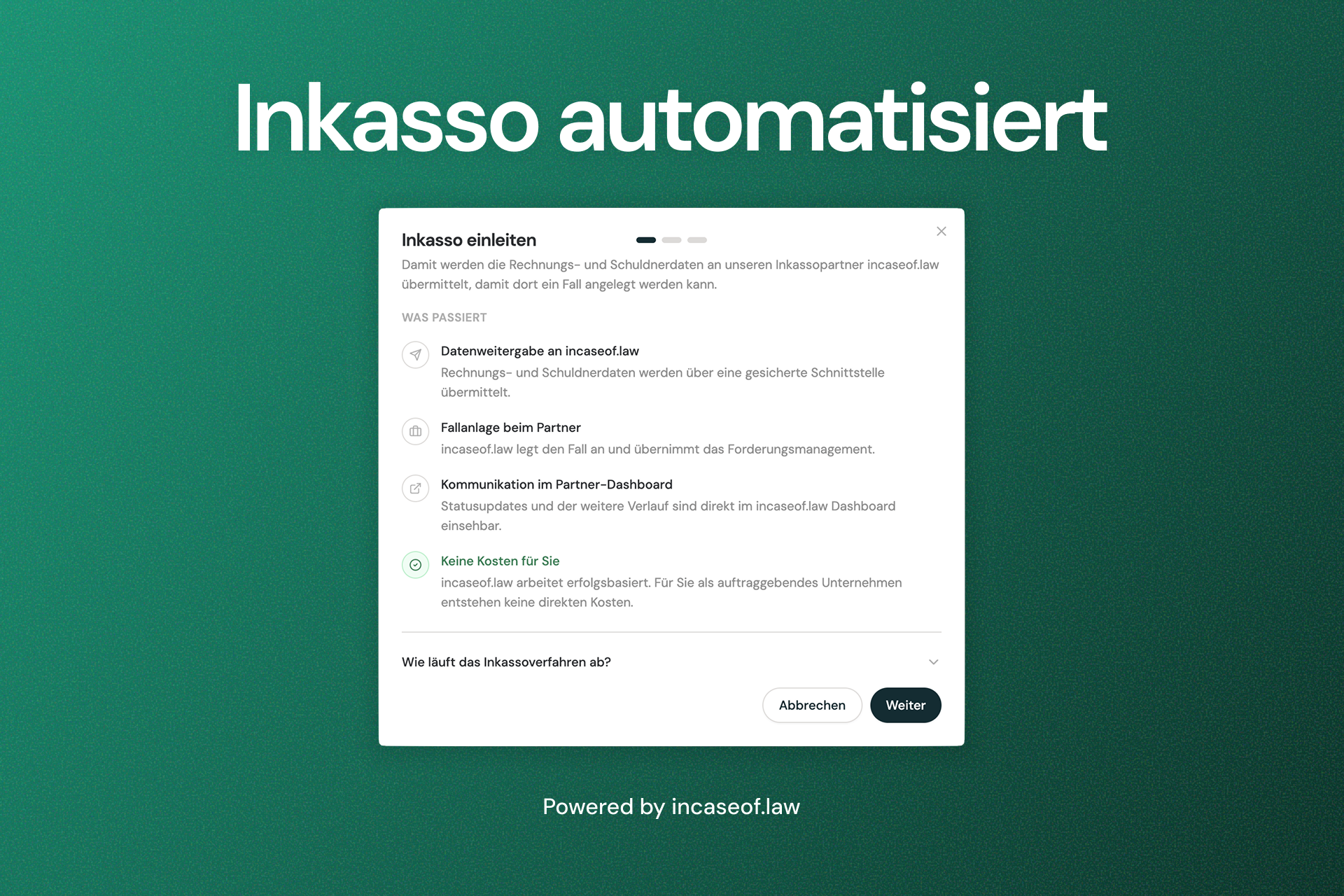
Debt collection with incaseof.law

ibana now integrates with incaseof.law, a specialized provider for out-of-court and legal debt collection. If an invoice is overdue and at least one payment reminder has been sent, a new "Initiate Collection" button appears on the invoice. A short guided dialog collects the necessary consents and sends the claim — including all relevant invoice and debtor data — directly to incaseof.law.

incaseof.law takes over the full collections process from there. There are no direct costs for your organization — incaseof.law works on a success-based model and recovers its fees from the debtor.

Once a claim is handed off, a status panel appears directly on the invoice in ibana, showing the current case status, collection stage, and last sync time — updated automatically in the background.

Learn more in the documentation →

Full-text and global search

  • Feature
  • User Interface

Global Search

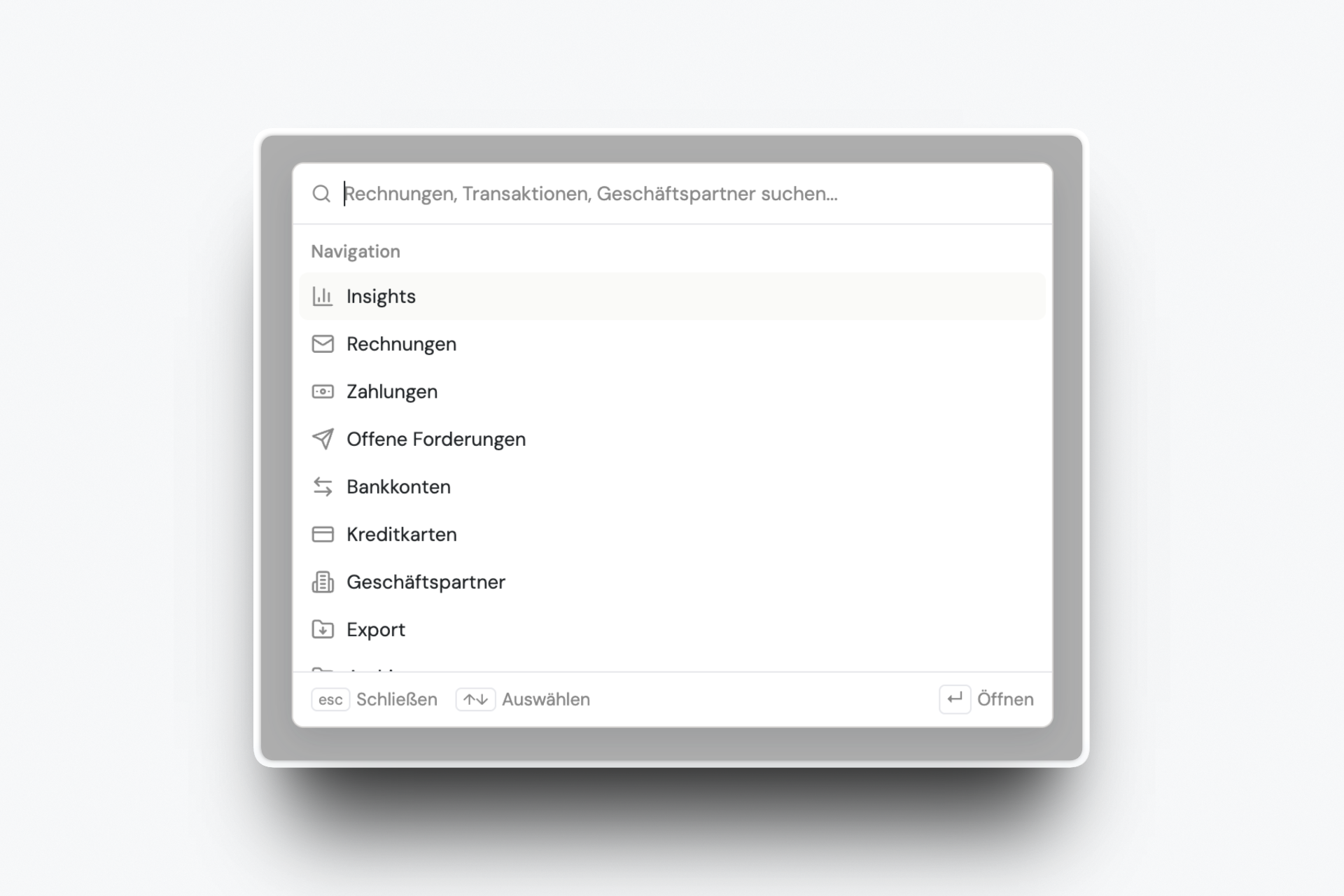
Search now supports full-text search for invoices. Instead of searching by metadata like invoice number or vendor name, you can search for any word printed on the invoice itself.

Search also has a new home. From one place, you can now search across everything — counterparties, invoices, and more — and find any result directly.

30 minutes. Your invoices. Handled live.